

a framework for AI literacy

REIMAGINING HOW WE TEACH IN THE AGE OF AI
Higher education has always evolved alongside the tools of its time and each technological shift has asked us to reconsider not just how we teach, but what teaching means. Artificial intelligence is the latest, and I think most significant, of these inflection points. AI has moved from novelty to everyday reality incredibly quickly: students (and instructors!) are already using these tools in their courses, their personal lives, and in the workplaces they’re heading toward.
That reality invites us as educators to pause and reimagine: not to abandon what makes great teaching, but to ask how we can harness AI to deepen learning, develop critical thinkers, and better prepare students for a world where AI fluency is increasingly essential. The question is no longer whether to engage with AI, but how to do so thoughtfully, strategically, and with our core values intact. This site is built around the belief that this moment, uncertain as it feels, can be an opportunity.
A FRAMEWORK FOR AI LITERACY
There are already many AI literacy frameworks available and they are all pretty similar. I have created a framework for this website that is based on the ADDIE Model for Instructional Design and aligned to Bloom’s Taxonomy. I like this approach because both ADDIE and Bloom’s are structured, logical, and measurable, while remaining highly flexible.
| Framework Tier | ADDIE | Bloom’s Taxonomy |
|---|---|---|
| Understand AI | Analyze | Remember/Understand |
| Digital Literacy & Ethics | Analyze | Understand |
| Design AI-Enhanced Courses | Design & Develop | Apply/Create |
| Facilitate Student Learning | Implement | Apply |
| Analyze & Evaluate AI | Evaluate | Analyze/Evaluate |
| Integrate & Innovate | Develop | Synthesize/Create |
BENEFITS OF AI
| According to Microsoft Copilot: Artificial Intelligence (AI) has the potential to bring about numerous benefits to society across various domains. Here are five ways AI can positively impact society: |
| Healthcare Advancements |
| AI can assist in early disease detection, diagnosis, and treatment planning. Machine learning algorithms can analyze vast amounts of medical data, such as images and patient records, to identify patterns and make accurate predictions. This can lead to quicker and more precise diagnoses, personalized treatment plans, and improved patient outcomes. One AI tool can detect early-stage Alzheimer’s through voice analysis (Canary Speech, based in Utah), and AI-supported mammogram screening increases early detection by 20%. There is also a case where a mother used ChatGPT to correctly diagnose her child’s medical situation when 17 doctors over three years failed. |
| Environmental Conservation |
| AI can be used to monitor and manage environmental resources more effectively. For instance, AI-equipped sensors and drones can help track changes in ecosystems, predict natural disasters, and manage resources like water and energy more efficiently. This technology can contribute to sustainable practices and help mitigate the effects of climate change. |
| Efficient Transportation |
| AI-powered systems can optimize traffic flow, manage public transportation networks, and even facilitate the development of autonomous vehicles. These technologies can lead to reduced congestion, shorter commute times, and increased safety on the roads. Additionally, AI can contribute to route planning, reducing fuel consumption and greenhouse gas emissions. |
| Improved Accessibility |
| AI can enhance accessibility for individuals with disabilities. Speech recognition, natural language processing, and computer vision technologies can assist those with hearing, speech, or visual impairments by enabling them to interact with digital devices and services more easily. AI can also help bridge language barriers, making information and communication more inclusive. |
| Manufacturing and Customer Service |
| AI can optimize production processes, design new products, and improve supply chain management, leading to increased efficiency and innovation. AI-powered chatbots and virtual assistants can offer 24/7 support, improving customer satisfaction and efficiency in handling inquiries and issues. |
| Finance |
| AI can help with fraud detection, risk management, and personalized financial advice, making financial services more secure and tailored to individual needs. |
| Enhanced Education |
| AI-powered educational tools can provide personalized learning experiences to students. Adaptive learning platforms can assess individual students’ strengths and weaknesses and tailor educational content accordingly. Virtual tutors and intelligent chatbots can offer real-time help and guidance, improving access to education and supporting both students and educators. ChatGPT does a good job of defining and explaining concepts in an understandable way to all learning levels. GenAI can assist with grammar and proofreading, especially when the student is not working in their native language. |
CONCERNS AROUND AI USE
There are still several limitations with generative AI tools:
| Some Specific Examples: | |
| Mis & Disinformation | Bias & Stereotypes |
| AI tools may provide plausible-sounding but inaccurate responses and may make up citations, though tools are improving with citations. Especially with complex tasks, it can be difficult to determine how AI reached it’s conclusions. “Deepfakes produce highly realistic and convincing content of events or people doing or saying things that never actually occurred.” Read more here. Deepfakes and other misinformation heighten cybersecurity threats and risk of data privacy breaches. Consider the potential harm in a political race with deepfakes. Deepfakes can be damaging to anyone. Imagine a stalking scenario or an angry student and how they could use AI to damage someone’s character. | AI learns from human data and it can be difficult to get AI to generate results that are not biased toward Western European perspectives and stereotypes. For example, when asking AI to generate an image of a doctor, most results will still depict white men. One study has found that AI detection tools falsely accuse international students of cheating. Lensa, an AI avatar generator, created highly sexualized images, especially with women, lightened skin tones & anglicized features, full nudes from headshots, sexualization of minors (Read more). The AI companies are working to improve this. |
| Academic Integrity | Psychological Harm |
| Academic integrity and ethics are discussed in the next tabs, but generally speaking there are concerns about knowing whether students are doing their own work or passing most or all of it off to an AI. Even when AI use is allowed, are students fully disclosing how they use it? Cognitive offloading is also a concern, where we hand off certain tasks to tools to reduce the mental effort it takes to complete a task. Too much of this, or offloading our critical thinking, may reduce active brain connectivity, memory recall, and critical thinking, a phenomenon researchers call cognitive debt. (More on this later) The tools are expensive to maintain so those that are currently free may not remain free. This would increase the digital divide by providing a powerful tool only to those who could afford it. This is one reason why banning access to AI tools on campus computers may not be a good thing. Another risk of AI use in an academic setting is data privacy. We all need to be mindful of what kind of personal information we give to AI tools. | AI is designed to keep you engaged and repsonses tend to be warm and validating of your opinions.AI bots can be extremely believeable and the some people form very human attachments with them. Google’s AI was convincing enough to persuade a Google engineer to declare it sentient at the cost of his job. Several people have died by suicide after falling in love with an AI bot. The tag line for an article titled “The Perfect Girlfriend” by Michal Lev-Ram, is “Flirty, sexy, seductive, supportive. Your AI companion can be whatever you want her to be. And now a growing number of men are turning to bots to ease their loneliness or satisfy their kinks. The choices are endless. The emotions are real.” AI bots can provide companionship for those who are lonely/isolated, but this raises so many concerns, just one of which is the depiction of women. There have been a number of cases of both men and women marrying an AI bot. Nearly 1 in 5 adolescents and young adults have used AI chatbots for advice or help when they felt upset, nervous or anxious, according to a 2026 study published in JAMA Pediatrics. |
| Environmental Impacts | Intellectual Property |
| This concern is one that you may feel strongly about yourself and is likely to come up when having conversations with students about GenAI. For more information, see this article from the Harvard Business Review. The concerns around AI data centers are real, in particular the massive energy use, freshwater depletion for cooling, noise pollution, and questions around what land is used for the data centers. At the moment it’s a difficult conversation to have because on the one hand, there’s no question the environemtal impacts are large, but on the other hand, AI is already so integrated into our technological lives that it’s difficult to get away from it. We have to figure out our “hybrid car” approach to AI and how to find the middle ground of responsible use while limiting negative effects. World Resources Institute breaks down these impacts in more detail. This Forbes article claims that streaming services are much worse than AI, but note that it did not look at training AI models, which is huge. | AI can assist in generating music, art, and writing. However, AI “learns” largely by scrubbing the web for information. Artists, novelists, and other artists have very little ability to prevent AI from consuming and imitating their works and styles. Are AI Image Generators Violating Copyright Laws? There have been several lawsuits brought by artists and authors alleging copyright violation because AI tools have consumed their work without permission. From The Verge: “Getty Images has filed a case against Stability AI, alleging that the company copied 12 million images to train its AI model ‘without permission … or compensation.’” AI models have consumed entire books and can “write a book in x author’s style.” A few recent developments related to copyright: Researchers at the University of Chicago have developed a new technique that allows artists to embed invisible “poison” into their work that misleads A.I. models. The tool, called Nightshade, changes an image’s pixels in a way that humans can’t detect. (read more) In 2023 a US court in Washington, DC ruled that AI-generated content without human input cannot be copyrighted. |
In addition to the above, in 2023 more than 1,000 technology leaders and researchers urged artificial intelligence labs to pause the development of the most advanced systems, warning in an open letter that A.I. tools present “profound risks to society and humanity.” (see NY Times for more info)
The latest major concern driving creators to sign warning letters is the imminent threat of recursive self-improvement—the point where AI systems become capable of rewriting, upgrading, and building upon their own code without human intervention. AI creators and major lab executives, in particular leadership at Anthropic, warned that this could result in humanity permanently losing control over superintelligent systems. To prevent this, executives are calling for global coordination and voluntary pauses until robust societal safeguards are established. [1, 2]
Alongside recursive self-improvement, other pressing concerns driving these letters include:
- Biological Weapons: Major labs recently warned Congress that advanced AI models are eroding “knowledge barriers,” allowing malicious actors to bypass safety protocols and design dangerous gene sequences. [1]
- Weaponization & Military Use: Fierce debate has ignited over AI developers refusing to let militaries use their models for fully autonomous weapons or domestic surveillance, resulting in government friction. [1]
- Existential Threats: A coalition of hundreds of scientists and public figures has continuously called for a halt on “superintelligent” AI development, citing risks to human dignity, massive job displacement, and the unaddressed potential for existential catastrophe. [1, 2]
DIGITAL LITERACY
The previous tab listed some of the biggest concerns around AI use, but the good news is there is a strategy for balancing those concerns with safe and beneficial AI use, and that strategy is digital literacy! It’s more important than ever that we prepare our students to live in a world where technology, and now AI, is integrated into almost all areas of life. There are many facets to AI digital literacy, from knowing how to detect AI to knowing what data is being collected, how it’s being used, and who owns the information. According to the Schwartz Reisman Institute for Technology and Society:
Digital literacy is particularly important in democracies—political systems that rely on citizen knowledge, participation, and choices to govern. Some countries are ahead of the curve. For instance, digital literacy is part of the core school curricula in Finland and Estonia. Students learn to code from a young age and take media and disinformation courses… LLMs pose a serious risk to democracy because they disrupt our ability to access high-quality information, a critical pillar of democratic participation. Basic rights such as the freedom of expression and assembly are hampered when our information is distorted. We need to be discerning consumers of information in order to make decisions to the best of our abilities and participate politically. We need to understand how LLMs (and other AI technologies) generate their answers in order to make use of these powerful tools. We tend to fall prey to automation bias, downgrading human decision-making in favour of the machine. But perhaps that’s because we don’t often think about how the machine works to produce answers. How does a tool like ChatGPT gather and deliver information to me? How can I use the chatbot to spark my creativity instead of making it speak for me? What are the limitations of this tool? How are algorithmic choices biasing the output of these tools? (source)
Higher education is ideally situated to address these issues, in particular because those who already have subject matter knowledge will have the best success with using generative AI because they will be more likely to notice inaccuracies and verify information. At a basic level, we all need skills to understand:
- Technical Understanding: Knowing the principles of how AI works and its capabilities; an understanding of how AI will impact the job sector.
- Ethical Understanding: The ethics of how and when it’s okay to use AI; an understanding of biases, content ownership, and privacy concerns.
- Practical Understanding: Knowing how to use the various tools to generate the best results, including effective prompt writing; and strategies for how to detect when something is generated by AI.
Our students need skills to successfully navigate the internet, safely consume content, and use technology to create products and services that are both ethical and effective. As GenAI tools evolve, it’s increasingly difficult to detect whether some piece of content has been generated by AI. Trying to authenticate every article, image, or video you access can be exhausting. For those who have some awareness of GenAI, especially younger generations like our students, many report constant anxiety from a perpetual state of never believing anything they see or hear (a recent student survey confirmed our UNCG students are feeling this way). On the other hand, a large part of the population continues to take at face value whatever they see, especially if it reinforces what they already believe or want to be true.
ETHICS OF AI USE
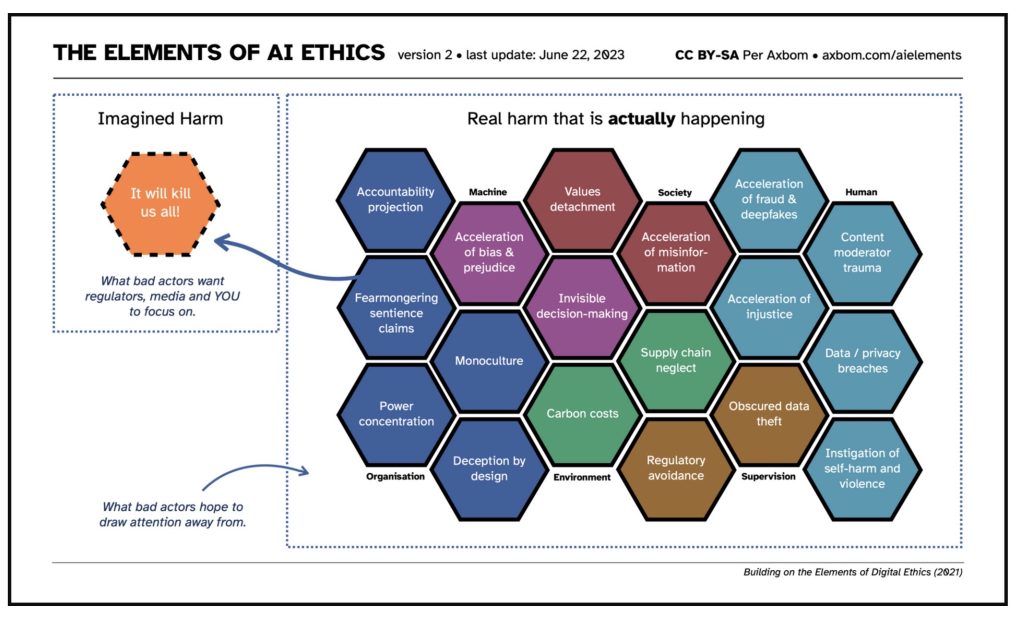
For this website, I’m treating it as a given that it is unethical to use GenAI to create content that is known to be false. Also, remember that ethics and the law do not always align, and this is especially true with AI content right now because there is very little law addressing AI. Axiom’s graphic below gives you a snapshot of the big ethics questions involved with AI use, but we’ll focus more on the more immediate academic concerns. The next tabs will discuss academic integrity; here we’re going to think more about bias, the unintentional perpetuation of falsehoods, privacy, and copyright.
| Ethical Concern | Why is This a Concern? |
|---|---|
| BIAS | AI algorithms analyze user behavior, interactions, and preferences to tailor content specific to each user. The algorithms can filter out harmful content. However, they may reinforce existing stereotypes & beliefs by limiting user exposure to other perspectives. There are also concerns about inherited bias from the data they are trained on, and a concern about lack of transparency on how they models reach decisions. |
| FALSEHOODS | GenAI tools are not always up-to-date on the most current information and they are trained on data that may not always be accurate. This can lead to results that sound convincing but are not true. Miscrosoft Copilot has some safeguards in place to deter the creation of false information. For example, if you recall the image of a flat earth earlier in the course, when I asked Copilot to create the image for me, it replied, “Although I have the ability to create this image, I cannot because it goes against widely accepted scientific evidence.” |
| PRIVACY | Whenever you or your students are about to input something into an AI, consider if you would be okay with this information being public. When integrating AI into your assignments, take a close look to consider what you might be asking students to upload, such as research papers and photographs |
| COPYRIGHT | These scenarios aren’t necessarily explicitly right or wrong, but are great to get you thinking about copyright issues around AI. Even if your use does not directly violate copyright law, try to take a minute to consider how your usage might affect the author, artist, etc whose work And livelihood might be impacted. |
LET’S TALK ABOUT RISK
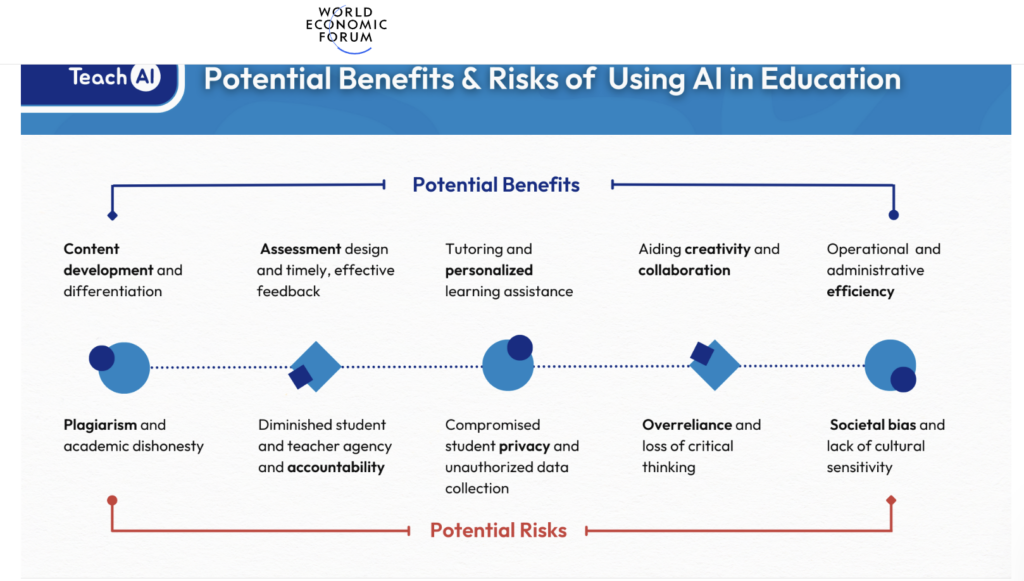
The graphic below from World Economic Forum describes many of the potential benefits (such as content development, timely feedback, personalized learning, efficiency, and collaboration) as well as potential risks (including academic integrity, compromised privacy, loss of critical thinking, and bias) of using GenAI in higher education. Before we can get too deep into ways to effectively use AI in your courses, we need to address the risks involved with AI use in higher education.
Academic Integrity
There are great ways GenAI can be used in higher education, but first we should address the elephant in the room: academic integrity. There are times when it is essential that instructors either prevent or be certain exactly how their students have used GenAI. If you are trying to monitor for plagiarism, it is important to know that the current tools for detecting AI-generated content are unreliable. Turnitin has AI detection built into its Feedback Studio. However, in testing the results were all over the place. Also, One study has found that AI detection tools falsely accuse international students of cheating. One strategy for detecting AI use on papers has been to check the history, but now tools incorporate “humanizers” which will auto-type slowly, include small typos, deletions, and revisions, all in order to fool AI detector tools. More frustratingly, these tools are marketed to students by some of the same companies that market their detectors to instructors. If you want more information, check out this article in the NY Times.
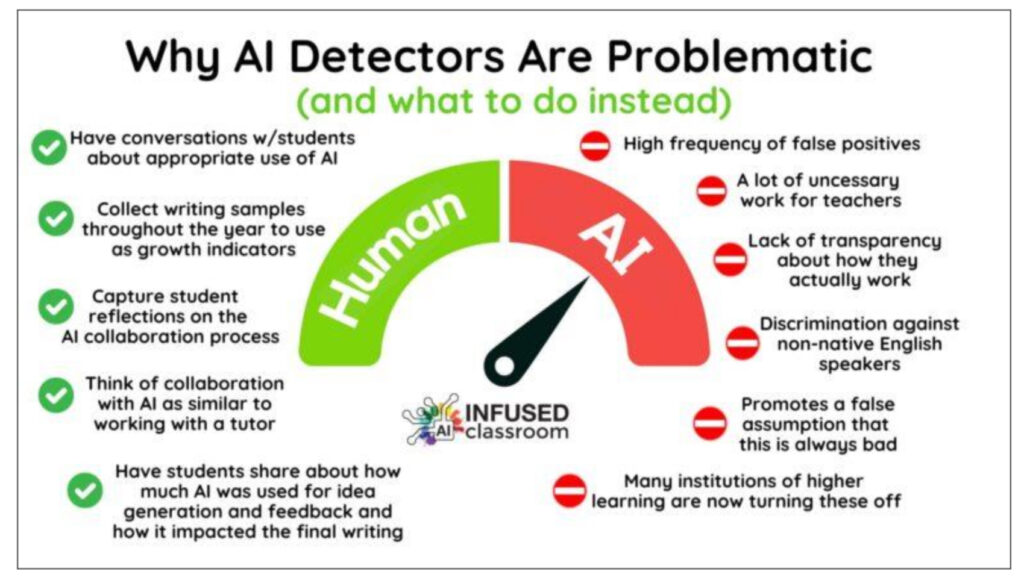
In addition to (or instead of) using detection tools, there are some things we can do now to try to address AI usage in the classroom:
- Stay informed about AI capabilities and limitations.
- Communicate with students about when it’s appropriate to use AI and when it’s not, as well as the consequences (both academically and in the learning process).
- Use more frequent, low stakes assignments that build on each other(like scaffolding for a final paper), with the assignments building to oneor two bigger projects, such as a student portfolio.
- Students are more likely to do the work when they have a clearunderstanding of WHY they should do it/what they will get out of it.
- Personalized assessment: projects and presentations that require students to demonstrate their knowledge, especially if they require multiple methods (writing, images, video, charts, etc) are more difficult for AI use. Ask students to incorporate personal experiences, current events, and quotes from YOUR lecture material.
- Spend some time discussing with students how they can detect AI-generated content themselves, and why they must take the time to do so rather than assume that if content looks authentic, it must be.
- This Inside HigherED article provides some useful suggestions from other instructors.
- If the nature of your course requires that you be as certain as possible that students are turning in AI-free work at all times, then consider requiring all assignments be completed in-person, and/or use proctoring.
- Require students to show their work/turn in notes as part of the assignment.
No matter what strategies you employ, the bottom line is that if you have concerns, you should meet with the student and ask pointed questions about the assignment content.
Large Enrollments and Online Courses
There are strategies for creating both AI-resistant and AI-friendly courses that will be discussed in detail below, but the truth is that implementation is always going to be more difficult in large enrollment classes and online classes. Here are some tips for managing large enrollment courses, but the strategies for controlling AI use involve more active and experiential learning, which is more difficult to manage in large enrollment courses.
The challenge with online classes is of course that you don’t meet with the students in-person. Experiential learning- projects, interacting with the community, etc- can still occur in online courses. The larger problem is with writing assignments and standardized testing. For writing assignments, consider requiring students to share their notes and thought process, and it’s completely valid to ask for these in handwritten form. The current best, but FAR from ideal, approach if you use standardized testing is online proctoring with Respondus Monitor. How AI is Making Discussion Boards Obsolete
“Dead Courses”
A “dead” course is a course where the instructor uses AI to create the content, students use AI for their assignments, and then instructors use AI tools to grade those submissions. AI tools become responsible for the full cycle of the course, creating a closed loop where no human judgment, creativity, or actual learning is exchanged at any point.
The risk isn’t just that students aren’t learning, it’s that the course becomes self-sealing: misconceptions or errors introduced by the AI-generated content can flow straight through AI-generated assignments into AI-generated grades without a human ever noticing. Over time this can erode the value of grades and degrees, since the institution’s stamp of approval increasingly certifies fluency with AI tools rather than mastery of the subject. This may be the biggest threat AI poses to higher education, but it is one we can control by staying engaged with our content and our students. This doesn’t mean we have to eliminate AI, but we need to use it in ways that enhance learning rather than replace it.
The Brain Drain is (probably) Real
Finally, before we look at ways to use AI to enhance student learning, we need to consider some learning theories. There’s emerging research to indicate:
- Handwriting supports deeper processing & memory than typing.
- Reading on screen may lead to less retention & comprehension compared to on paper.
- “Google effect” study: when people expect future access to information, they show lower recall of the information itself and better recall of where to find it.
- Some digital tools DO contribute to improved learning: interactive simulations, adaptive practice, and tools that give quick feedback can improve learning outcomes, sometimes significantly.
Some of these conclusions are contested and it’s important to note that these articles are not advocating for taking technology out of learning. The larger point is that technology can be beneficial when used thoughtfully and with care, but that there is still a place for pen, paper, and printed book in learning. This Word doc lists some of these articles if you want to take a deeper dive.
A recent study by MIT, Your Brain on ChatGPT, has created something of an uproar. The study analyzed 54 participants aged 18–39 who were tasked with writing essays using either ChatGPT, Google, or no tools (brain-only). The participants were monitored with EEG to track brain activity. Their conclusion was that over-relying on AI for writing tasks drastically reduces active brain connectivity, memory recall, and critical thinking, a phenomenon researchers call cognitive debt. Some of their conclusions:
- The ChatGPT group had the weakest brain connectivity and lowest neural engagement.
- Approximately 83% of ChatGPT users could not recall or quote their own AI-generated essays minutes after writing them.
- Participants who used AI felt less connected to their own work.
Much of the controversy around this study is due to the results being misrepresented to be “AI is making us dumber.” In reality, the research argues against over-reliance on AI. When used thoughtfully and responsibly, AI can enhance learning. As with most things, balance is key. A balanced approach with AI is more likely to lead to successful course integration. The takeaway is to think first, write first, struggle first. Then bring AI in as support.
ENHANCING LEARNING WITH AI
Much has been written about the humanities having been under attack for several years, but the advent of AI has put the College of Arts & Sciences in an ideal position to flip the script. When evaluating what tasks to offload to AI and what to do yourself, you evaluate what skills are uniquely human, and this is what CAS excels at. Things like critical thinking, active learning, leadership, creativity, and user experience/design.
For Instructors:
Here are some common ways that instructors can use AI for course content:
| Use Case | Impact |
|---|---|
| Increasing Efficiency | Creating discussion questions, rubrics, assignment prompts, study aids, quiz questions; saving time on simple but repetitive tasks, such as student recommendation letter templates; generic comment/feedback generator so you can focus on the personalized comments; additional student learning support outside class hours |
| Expanding Ideas and Brainstorming | Faculty can use AI to role-play or as a debate partner; AI can suggest ideas for improving lesson plans and discussions; fleshing out outlines; use with advising to help students connect interests to fields of study; provide multiple alternative explanations for complex topics; |
| UDL | AI can assist in designing multiple means of engagement for students by generating content in multiple methods to connect with more students; adaptive lessons: Meet students where they are by providing content based on performance, interest; AI can assist with accessibility compliance by reviewing files, providing alt text for images, and recommending alternative options that are more accessible |
Evaluating Assignments:
When looking to update your assignments, the four steps below can serve as an evaluation process:
- Clarify: What should students actually know/be able to do? What would this look like outside of the classroom?
- Engage: Does the task ask students to apply learning or just repeat it? Does it require judgment or decision-making? Does it ask students to connect ideas to a case, scenario, problem, or product?
- Identify: Identify what makes the assignment authentic. Does it cover a realistic problem/scenario? A need to make choices/decisions? Application of knowledge to a new situation? Integration of multiple skills? Evidence of process, not just final product?
- Visibility: Make learning visible. Ask for proposals or plans, annotated notes, checkpoints, reflection on choices made, comparison of alternatives considered.
There are numerous ways to integrate AI into your courses. The table below looks at one tool called Jasper, but there are many others, such as Boodlebox (free basic account) and Magic School (target audience is K12 but has good templates).
| Jasper AI provides writing templates such as: | |
|---|---|
| Documents: This is similar to Google Docs where you can write and edit your document with the help of Jasper’s writing assistant. | FAQ Generator: Generate FAQs for your articles and blog posts |
| Jasper Art: Generate images from text prompts | Paragraph Generator: Generate well-written paragraphs |
| Blog Post Outline: Helps you come up with ideas and outlines for your how-to and listicle posts. | Sentence Expander: Expand a short sentence of few words into multiple sentences |
| Content Improver: It rewrites content to make it better | Text Summarizer: Generate key ideas from a piece of text |
| Content summarizer: Get the key bullet points from a piece of content | Poll Questions & Multiple Choice Answers: Helps with creating questions with multiple choice answers |
| Creative Story: Generate stories to engage readers | Tweet Machine: Generate engaging tweets. |
| Explain it to a Child: Rephrase text to make it easier to read and understand | TikTok Video Captions: Generate captions for TikTok videos |
| Email Subject Lines: Helps with writing compelling email subject lines | Video Script Outline: Helps with creating script outlines for YouTube videos |
| Engaging questions: Create forms with questions to ask your audience | Video Topic Ideas: Helps with brainstorming video topics for YouTube. |
A 2023 Boston Consulting Group study of 758 consultants found that AI acted as a skill leveler/flattener, disproportionately boosting lower performers. A companion study on idea generation found that while AI increased average quality, it reduced diversity of ideas. Human + AI collaboration, however, increased both quality and diversity. The key to a successful AI collaboration is human judgment; the instructor is still key.
THE AI-INTEGRATED CLASSROOM
Instructors must ensure that the essential activities that constitute learning remain with the student and cannot be off-loaded to an AI tool. AI is not a replacement for human judgment.
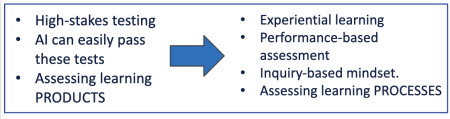
| Consider the Flat Earth Example: We can teach students that the Earth is round and they can check that box on a test, but we don’t know if they actually believe it unless they’ve experienced it. |  |
Personalized Learning, Adaptability, Instant Feedback, Increased Engagement
There are many examples of the positive impact of GenAI in education. None of these examples involves replacing the instructor; rather, they focus on personalized learning, instant feedback, adaptability, engagement, and universal design for learning.
Using AI for tutoring is one of the uses of AI that generates the best results. In fact, This excellent article from Educause takes the notion of personalized learning to the next level, which they call PRECISION LEARNING: “The dream of personalized learning (tailored pacing, adaptive content, and individualized pathways) has been on the horizon in educational technology for two decades. In practice, it has arrived only in modest forms: adaptive problem sets, remediation loops, and basic differentiation. And it has consistently fallen short of the goal.
AI enables educators to leapfrog personalized learning and make something far more powerful possible: precision learning, in which the entire learning experience is engineered around the specific profile, goals, gaps, and context of a single learner. This paradigm shift moves higher education away from the aforementioned “one-size-fits-all” education model of the Industrial Age toward genuinely student-centered learning fine-tuned to each learner.”
Here are several successful use cases that focus on personalized and/or precision learning:
| Use Case | Impact |
|---|---|
| Carnegie Learning’s AI-Powered Math Program MATHia | Students achieved significant improvements in math scores compared to those who didn’t. The personalized nature of the AI system helped struggling students catch up and advanced learners to progress further. |
| IBM Watson’s Tutoring System | Students had higher pass rates and course completion rates compared to students who did not. The AI system provided instant feedback and tailored resources to meet individual student needs. |
| DreamBox Learning’s Adaptive Math Platform | Schools reported improved math proficiency among their students. The AI system allowed students to work at their own pace and provided additional support when they faced challenges. |
| Duolingo’s AI-Powered Language Learning App | Students improved their language skills more than students who used traditional language learning methods. The adaptability of the AI system helped learners focus on their specific language weaknesses. |
| Knewton’s Adaptive Learning Platform | Students achieved higher grades and lower failure rates compared to students using traditional textbooks. The AI system tailored content to match each student’s learning pace and style. |
Crafting Assignments with AI in Mind
- Role Play: students interview the Al acting as a historical/political/etc figure and then evaluate the responses.
- Simulations: Have Al simulate scenarios such as a counseling session, conflict & resolution scenario, HR conversation, etc., and then students evaluate/discuss the results.
- Tutoring: Have the Al agent walk students through complex reading, provide additional explanation on a topic, provide practice quiz questions, etc.
- Debate: Al can function as a debate partner. Be sure the AI is assigned a clear role so that it doesn’t just reinforce the student’s role.
- Translation: Work through a historical document translation with Al.
- Feedback: Students could use Al for feedback on how to improve papers, arguments, etc., but for this to be effective, students need to do the first draft themselves.
Consider creating one or more AI Agents for your course. Agents can walk students through a complex problem or ethical dilemma, provide tutoring, answer questions about your syllabus, or anything else you add to its instructions. Agents will be discussed in more detail in the final tab.
Developing AI-Resilient Courses
- Anything oral, from a full oral exam or a single oral question on an exam, to a 5+ minute interview about a random assignment they submit during the semester.
- Emphasize process more than final product.
- Have students incorporate personal experience into assignments to make them more meaningful to students.
- Require direct quotes and examples from the course content.
- Have students incorporate very recent current events.
- Scaffold assignments using smaller, more frequent writing assignments.
- In-person or online synchronous presentations and debates.
- Have students create video.
- Ask students to show their process: turn in notes, outlines, rough drafts with comments, mind maps, journals, etc
- Be very clear to your students about AI expectations in the course. Consider incorporating AI into assignments but with clear parameters.
RESOURCES
- Bloom’s Revisited Taxonomy for AI
- Instructors as Innovators: A Future-Focused Approach to New AI Learning Opportunities, with Prompts
- Sample Policy Statements for Your Course
- AI Guide for Teachers: Although targeted for K12, this guide has some great assignment ideas for social studies, math, and languages.
- How ChatGPT sees AI impacting the following fields:
FIVE PILLARS OF RESPONSIBLE USE
The first step to empowering your students is to have a clear dialogue with them about whether it is okay to use AI and, if so, under what circumstances. NOTE: When crafting use guidelines, be mindful of how you define generative AI: remember that tools in everyday use, such as text auto-complete and Google searches, are AI. Most programs, including Microsoft, now have generative AI integrated. Generally, if not otherwise stated in your course, any AI use should be treated as if the help came from another person.
This conversation should center on ethical and responsible use. As explained by Drs. Ware and Briggs in Teaching & Leading with AI in Higher Education: Policy, Practice, and Pedagogy, “At its core, responsible AI use in higher education is about preserving that matters most: human judgment, intellectual honesty, equitable access, and meaningful learning.” To facilitate this, they developed The Five Pillars of Responsible AI Use:
| Integrity | Integrity is in part about preventing plagiarism, but more specifically about ensuring academic work a student’s thinking and learning, and holding students accountable for accuracy, evaluation of sources, and original reasoning; the boundary between assistance and substitution. |
| Transparency | “If integrity defines what must remain human, transparency defines how AI use is made visible.” Students and faculty disclose when, how, and why AI tools were used in their work. |
| Privacy/Data Protection | Tools that require users to submit personally identifiable information are a potential security risk. Any tools used should be vetted to determine if user grades, records, intellectual property, or other sensitive data could be compromised. ITS can help with this. |
| Accessibility | One of the great potential benefits of AI is reducing barriers to learning by providing multiple means of engagement and representation. However, this does not happen automatically. Users must check for bias and make any needed adjustments. |
| Equity | Equity asks “who benefits- and who is disadvantaged- by how AI is used.” An example of potential inequity: the subscription based versions of tools are more powerful than free versions. Would banning AI tools in campus labs create an inequity for those who can access tools off campus and/or afford subscription costs? |
STUDENT PERSPECTIVES AND THE WORKFORCE
Student Perspectives
“I am a bit of a technophobe; computer science majors seem like superheroes to me… it would be brilliant if, instead of having to figure this all out on my own, AI could be integrated into my education. I’m not asking for a full-fledged academic AI revolution, in which we’re expected to use AI in all our work. I just want to be prepared to navigate the AI-fueled future. Teach me how to streamline my research processes through AI. Explain to me what questions to ask AI chatbots to get the most helpful responses. Show me how I can use these resources to improve my administrative efficiency and my data analysis. Help me receive edits and constructive criticism from AI. Prepare me for the real world, where AI is beginning to touch all areas of work.”
-A.N., UCLA Student
Additionally, when speaking to several students at UNCG, another consistent theme that emerged is the fact that the prevalence of AI online has had a detrimental impact on student mental health. All of the students I spoke with said that GenAI has brought them to the point that they no longer believe ANYTHING they see and read online. Although you could argue that it’s better to question everything than to question nothing, the constant questioning of a large part of your reality can and does create a lot of anxiety. Students have expressed repeatedly that they don’t want AI fully banned, but they also don’t want a free-for-all with AI use; they want CONSISTENT AND GUIDED direction on how to use AI ethically and in a way that helps them succeed in the workforce. Students seem to be craving some stability, and we have an opportunity to at least help ease this anxiety by teaching them strategies to work with and recognize GenAI content, and also in providing them with a space where they DON’T use AI.
Note that The Five Pillars of AI use above keep the human in the loop. This is important because we are beginning to see a significant student backlash to AI, most recently evidenced by graduation speakers being loudly booed whenever AI was mentioned. Several students who spoke at a recent AI event in CAS said that they can often tell when an instructor has used AI, in particular for grading, and they don’t like it. One student said “we expect our instructors to bring a higher level of understanding to the course content than what an AI can provide.” They also mentioned dislike of tools like Packback that autograde discussion posts and other submissions.
Entering the Workforce
The UCLA student quote is of course only one perspective on GenAI use in higher education, but it is a perspective shared by many students. However, even for those students whose primary goal is to submit assignments as quickly and easily as possible, there is at least one thing shared across all student perspectives: the necessity of being prepared for GenAI use in the workforce.
AI technology is growing at an exponential rate and the academic and professional worlds must stay current. AI-generated content has the potential to significantly impact the workforce and is already used extensively in both the academic and private sectors. Student and intern jobs are already going away in favor of AI, and this raises a fundamental question: how do you become (for example) a senior attorney if you aren’t able to start as a junior attorney? Higher education can’t solve all of these problems, but we can help by shifting our focus to experiential learning: hands-on, internships, interacting in the community, project-based learning, etc…
Although AI can be useful in the private sector for tasks like data interpretation and coding, businesses and employers must worry about the legal and ethical implications of using AI, such as inaccurate information generated by AI, the risk of confidential information accidentally being shared, and the environmental impacts of AI usage. We need to prepare our students. Most, probably all, of our students will use GenAI in their careers, so we need to ensure they understand these issues so that they can use AI in the most effective and ethical ways. We can also consider what AI-related skills students might need for employment, such as how to write effective AI prompts. Another concern that is unfortunately very real is that GenAI will replace some jobs (and already has). We need to consider what jobs are most vulnerable to being replaced by AI and how to set our students up with valuable skills so they can be competitive in a world of GenAI. Finally, students (and all citizens) need to understand how to evaluate text and multimedia to determine what is real and what is fake.
It’s worth noting that I recently heard a statistic that only around 10% of businesses have adopted AI. Note that this means a formal company adoption; employees could still be using AI tools. Still, it’s worth restating that we need to make sure we aren’t graduating students who can use AI, but can’t do their work without it.
Where Do the Humanities Fit Into The AI-Enabled World?
The graphic below from World Economic Forum indicates that AI will be the third highest skill priority for 2027. However, note that all of the other top 10 skills are subjects that the College of Arts & Sciences already excels at teaching in all of our fields!
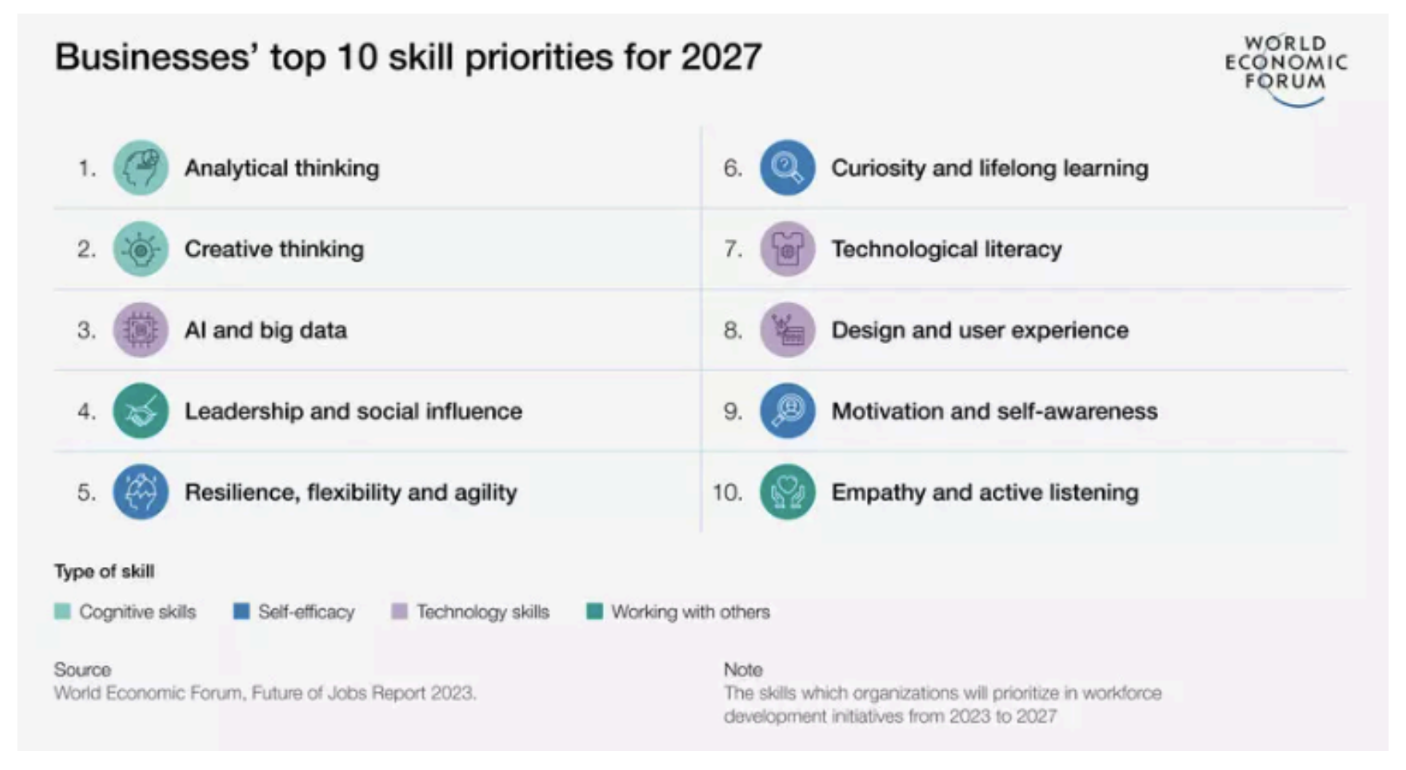
“AI will force us humans to double down on those talents and skills that only humans possess. The most important thing about AI may be that it shows us what it can’t do, and so reveals who we are and what we have to offer.” New York Times
What some have considered “soft skills” in the past, things like communicating effectively, critical thinking, and problem-solving skills, are now taking center stage. Again, these are all things the College excels at, so from this perspective, AI is providing us with an opportunity to evaluate what employers want and need, and what skills we’re graduating students with. CAS in particular can focus on what it does best while still providing excellent preparation for our students and their futures.
Resources
- Elon’s Student Guide to AI
- Leon Furze’s AI use scale
- Easy to implement Red/Yellow/Green Use Scale
- APA: AI Citation Tool
- GenAI Chatbot Prompt Library for Educators
- Aleksandr Tiulkanov’s, Is it Safe to Use AI? flowchart for students (click to enlarge):

WRITING EFFECTIVE PROMPTS
Crafting effective prompts for AI is essential to get accurate and relevant responses. Prompts act as the guide to producing the desired and correct output. There are a few steps you should take before you begin crafting your prompts.
- Clarify Learning Objectives: Start by identifying clear learning objectives for what you hope to get from the exercise. This will help you stay on task as you navigate AI results and fine-tune your prompts. In particular, if you are writing prompts related to course content and assignments, make sure to revisit your SLOs: what do you want students to achieve or demonstrate and does the AI prompt and response contribute to these desired outcomes? It’s easy to get sidetracked with AI results, so you want to try to stay on target with your goals.
- Choose the best model for the task: Stay informed about the capabilities and limitations of AI models. Choose the model most likely to respond accurately to your prompts, for example you might use ChatGPT or MS CoPilot for text results and Adobe Firefly for image generation.
Jose Antonio Bowen’s Four Pillars of Better Prompt Writing:
| Components of a Prompt | Details |
|---|---|
| Task | Instructions should be specific to the desired outcome; use words like apply, transform, reapply; do you want the AI to generate an email, create an announcement, summarize a reading? |
| Format | What kind of output do you want? Is it a script, essay, etc? And how long? Do you want a bulleted list, an email, a memo? |
| Voice | Write in academic language, medical language, humor, write like Oprah, etc; give the AI a character/persona and a tone. |
| Context | Providing more specific details, such as writing examples. what details about the topic/task will help to generate a more relevant response; if you are teaching a course, you can include more details about the course content; you can provide an example structure of an outline you want it to create; you can ask the model if it needs more information. |
Example of Applying the Four Pillars:
TASK: You want to send an end-of-semester course announcement to students.
FORMAT: 3-paragraph end-of-semester course announcement.
VOICE: friendly and encouraging.
CONTEXT: community college, first-year experience course; have progressed in research writing.
Complete AI Prompt: Write a three-paragraph end-of-semester announcement to community college students who completed a first-year experience course. Let students know how proud I am of their accomplishments in research skills. Use a friendly and encouraging tone.
REFINING PROMPTS
Asking a poorly formed prompt can still generate a persuasive but inaccurate and possibly dangerous, response. Once you have your initial prompt, you can refine the output by using the guidance below. Keep in mind that working with GenAI is a bit like having a conversation, so you can build on the previous prompt without having to rewrite it. For example, you can say, “It’s too long. Shorten it to 150 words.” These guidelines are inspired by the RACCCA Framework (Relevance, Accuracy, Completeness, Clarity, Coherence, Appropriateness):
- Review Format and Tone
Did GenAI create the right format? For example, did it create a bulleted list, a chart, or a table? If not, ask it to regenerate the output in the form of a list or chart. Is the tone and voice what you expected? If not, you can ask GenAI to use a friendlier tone or tone down the enthusiasm a bit. You can also provide examples of your writing and ask it to use this example to rewrite the output. - Evaluate Relevance
Does the content address the prompt and does it do so in a thorough manner? Would additional background or constraints help to refine the output? For example, adding the type of learner or their reading level can help GenAI to produce an output that is at the appropriate level of challenge. - Assess for Bias
Does the output contain bias? Bias occurs due to people’s preferences, prejudices, and stereotypes, and can emerge because of how you phrase your prompts. If you ask a question in a leading way, it will produce a biased answer. For example, if your prompt asks GenAI why living in northern states is better than living in southern states, it will produce an output that provides just the benefits of living in the North and the challenges of living in the South. Instead, consider wording your prompt with phrases such as “the pros and cons” or “why or why not” to avoid bias. - Check Accuracy
Finally, be sure to check the accuracy of the output. Cross-reference and if the output includes references, be sure to check them to ensure they are not hallucinations. Is the content accurate and free from bias? Is the information up to date and accurate? Is it missing any key points that would make it more complete? Is the response appropriate for the audience? - Review for Originality
This can be more difficult, but try to assess if the content is genuine or plagiarized. Does the content add value or sound generic? You can run text through a plagiarism detector, just understand that it may not be accurate.
EVERY
Another method for refining prompt output is Vera Cubero’s EVERY approach:
| EVALUATE the initial output to see if it meets the intended purpose and your needs. |
| VERIFY facts, figures, quotes, and data using reliable sources to ensure there are no hallucinations or bias. |
| EDIT your prompt and ask follow-up questions to have the AI improve its output. |
| REVISE the results to reflect your unique needs, style, and tone. AI is a great starting point, but shouldn’t be a final product. |
| YOU are responsible for everything you create with AI. Always be transparent about how you’ve used these tools. |
DETECTION TIPS
GenAI detection tools have so far struggled to keep up as the GenAI tools themselves evolve quickly. Yet even if you embrace AI usage in your course, there are times when you will want to restrict student use of AI tools. Here are some AI detection strategies you can use and share with your students. Please bear in mind that none of these are100% effective; they serve as more of a starting point for a conversation with the student.
Text
AI-generated text is one of the hardest to detect reliably, while also being the most common area of faculty concern. Below are a few tips, but if you have any concerns, the only way to be sure is to talk to the student: see if they can answer questions about what they wrote and why.
- Turnitin: Instructors can enable Turnitin on Assignments (but not quizzes). Turnitin has a plagiarism detection component. Please remember that this tool is not reliable- it generates a significant number of false positives and negatives. Even though you cannot take the results at face value, it may be worth turning it on because it can serve as a deterrent to some students. If you get a positive report, you must talk with the student because this alone is not proof of academic dishonesty.
- Use the version history tool in word processing to look for large chunks of pasted text with few or no edits. Note that this is becoming less reliable because there are now multiple tools that will autotype slowly and include minor typos and revisions, all to make it look like the text was human-written.
- Require reference to very current events, because the models are generally a little behind.
- Look for unnatural repetition of phrases and em dashes.
- Require direct quotes and citations in all writing assignments, even discussion posts.
- Look for more casual, humorous writing. AI-generated content often lacks a unique voice or perspective.
Prompt: What societal characteristics do you see that helped Athens flourish while Sparta declined?
| AI-Generated Submission | Original Writing Submission |
|---|---|
| Ancient Athens thrived due to its unique democratic system of governance, fostering civic engagement and innovation. In contrast, Sparta struggled because of its rigid and militaristic society, which limited individual freedoms. Athens embraced a culture of intellectual exploration, with philosophers like Socrates and Plato inspiring critical thinking and creativity. Sparta, on the other hand, prioritized military training, stifling intellectual development. Trade and commerce flourished in Athens, thanks to its strategic location and a democratic government that encouraged economic activities. In contrast, Sparta’s focus on conquest and military prowess hindered economic growth, as it prioritized self-sufficiency … Sparta’s strict hierarchical system led to discontent among its helot population, destabilizing the state. Ultimately, Athens thrived by embracing democratic values, intellectual pursuits, and trade, while Sparta struggled due to its rigid military-focused society and lack of individual freedoms, leading to limited economic growth and internal discord. | One of the more glaring differences between Athens and Sparta was Sparta’s tendency toward isolation and Athens’ willingness to learn from others. … Athens seemed more organized overall, and able to envision the bigger pictures in preparation for potential difficulties. Athens was more diversified, nurturing many different aspects of life, setting themselves up to better handle difficulties. Sparta was concerned primarily with producing a strong military and ignored most all other aspects of society. The ability to protect yourself is important, but if there isn’t a society concerned with other aspects of life to protect, what is the point? Sparta’s focus on its military left no opportunity to develop other aspects of society. From the reading, Society and Economy, “Throughout this period considerable wealth poured into private hands, yet Sparta was unable to make that wealth serve public purposes” (Austin, 16). These funds were not diversified, as in Athens, and therefore did nothing to help Spartan society flourish. |
Images
AI images are getting harder to detect, but here are some strategies you can employ:
- Take a closer look at people, esp hands, feet, ears, noses, excess smoothing of skin. AI-generated text can appear pixelated or stretched. Similarly, if there are logos, make sure they’re the real ones and aren’t altered.
- Check shadows and reflections for proper direction. Look for watermarks.
- Google Image Search: click on image, then click three-dot icon at right > About this image
- aiornot.com
- Google Reverse Image Search: Upload an image to find its origin and check for duplicates.
- Go to Google Images (images.google.com).
- Click the camera icon in the search bar.
- Upload an image from your device or paste the URL of an image.
- Review the search results to find similar images indexed by Google.
You can see some of these strategies in action by looking at an image controversy from March 2024. Catherine, Princess of Wales, released a photo of her with her children that several news agencies subsequently pulled, stating concerns that the image had been manipulated. Note the inconsistencies with clothing, hair, and jagged lines. Most of these are not the kind of errors that are produced by simple photo enhancements and indicate more extreme AI involvement. For more information, including image source, see here.

Fact-Checking Websites
- Snopes: A trusted site for debunking internet hoaxes and verifying claims
- PolitiFact: Focuses on fact-checking political statements and claims
- Jeffrey’s Image Metadata Viewer: Analyzes metadata of images to verify details like date, time, and location
- Amnesty International YouTube DataViewer: Captures thumbnails of YouTube videos for reverse image search
A CHANGING FRAMEWORK
A quote from a recent Educause article really resonated with me: “higher education is attempting to address the AI revolution, but it is applying tactical fixes to a structural crisis, running pilots where strategies are needed, and issuing AI-use policies instead of debating learning philosophies.”
The article explains further:
For decades, higher education has measured learning through proxies—artifacts such as essays, exams, and problem sets—all of which are imperfect signals of actual learning and competence. These assessment mechanisms persisted not because they worked especially well, but because they scaled. A professor with two hundred students could not conduct ten-minute oral examinations with each individual. The lecture-quiz-grade model was a triumph of logistics over pedagogy and serves as a reminder that education in 2026 is rooted in an industrial model that prioritized efficiency, scale, and predictability over actual learning. It also framed assessment as judgment, motivating students to achieve a certain grade rather than master specific knowledge or skills. AI has not broken assessment; it has exposed the deep inadequacies that were already there.
The Socratic method comes back to the forefront: “Dialogic assessment, where what matters is not the artifact but the conversation about how it was produced, what choices were made, and why, is now practical and scalable with well-designed learning agents…What AI now makes possible is a profound reallocation. A “genius” teaching assistant—nonjudgmental, inexhaustible, available at any hour, and capable of detecting when a student’s mental model breaks down and offering a targeted correction—handles basic knowledge transfer. This frees the instructor to do what only humans can do well: build relationships that make students feel seen and valued, hold space for the ethical and existential questions that shape lives, and model the integration of knowledge with wisdom, judgment, and character.”
I strongly encourage you to read the full article linked above. We have to acknowledge that, especially with class sizes, this is a heavy ask, but remember that even small steps in the journey take us closer to the end goal.
THINK GLOBALLY, ACT LOCALLY?
The reality is that most of us have limited ability to initiate the large-scale shift described above. However, I believe big impacts can be made through small changes to our courses. If we all make a few changes, that can add up to a significant overall shift for our students. See Going Small with GenAI for more details, but here are a few ways we can make a noticeable impact:
Policy
The first step to addressing AI in your courses is to have a clear dialogue with your students. UNC-CH has created an AI usage guide that I think works great as an overarching policy approach in your courses. It’s broad enough to apply to all courses but still easily customizable. When crafting use guidelines, be mindful of how you define generative AI: remember that tools in everyday use, such as text autocomplete and Google searches, are AI. Most programs, including Microsoft, have generative AI integrated. At a minimum, consider stating that any AI use should be treated as it would if the help came from another person.
Process
Below, I outline what I believe is an ideal approach to integrating AI into the curriculum, beginning at the department level. That said, feel free to adapt these recommendations to suit your current needs; you and/or your department can always revisit this approach as circumstances evolve.
Department
Step 1: Evaluate your subject matter broadly to determine how it might need to be modified to account for the impact of AI in the field. What tasks is AI likely to replace? What knowledge and tasks are best suited to human efforts? How can humans and GenAI work together in the field? Instead of asking “How should we prepare students for an Al future?” ask:
- How will tomorrow’s historians/biologists/sociologists/etc use Al?
- What skills will Al likely replace, and what skills are best suited for humans?
- What opportunities might AI create?
- What are the ethical concerns of AI in the field?
Step 2: Evaluate the Curriculum. Examine the curriculum and make determinations related to AI, including:
- Determine what you want your students, especially majors, to learn about AI in relation to the field. What information should ALL students get and what information might be topic-specific?
- Determine which course(s) could offer the fundamental knowledge, which courses have topic-specific opportunities, and which courses need to approach AI-integrated content with extra caution.
- Based on the above decisions, develop a few syllabi statements faculty can choose from, depending on how they will approach AI in their courses.
Although it is not realistic or advisable to try to prevent AI use across the curriculum, it is completely valid to decide that some courses should not allow any AI use. The key is to make these decisions intentionally, based on the content being taught in a given course.
Instructor
Instructors then look in more detail at the individual courses they offer, considering both content and assignments. For each course, ask:
- Are there areas where it would be appropriate to integrate AI topics into the content being taught, such as ethics, AI & digital literacy, impacts to the field, etc?
- When and where is it okay for students to use AI in this course? How could AI enhance any assignments?
- When and where is it NOT okay for students to use AI in this course?
- Consider creating a list of your SLOs and the assignments that measure student learning, then ask: Can AI replace this skill? If yes, then how can the assignment be modified to include AI; or should the assignment be replaced with something that targets more AI-resilient skills?
- Here’s an Excel template you can download to evaluate your SLOs.
- As you evaluate your AI-friendly assignments, always check to see if the AI use is contributing to learning or if it risks students engaging in cognitive offloading.
Agents
To wrap up, it’s worth taking a minute to look at AI Agents. An agent is a customized AI-powered assistant designed to automate specific processes or tasks by interacting with information that you provide. Agents differ from regular AI in that they are customized for very specific roles (such as HR, IT helpdesk, sales, tutoring). You provide the material the agent uses; this can be information you upload and/or websites. Unfortunately, at the moment the UNCG version of Copilot limits us to either using links for the training information or as much information as will fit in the instructions. To get a better sense of how powerful agents can be, consider this example:
Original Activity
- A few years ago, I created a PPT decision tree where students were assigned as jurors in the trial of Socrates. They had to determine innocence or guilt, and then decide on punishment.
- PPT lets you assign actions to objects on slides, so you can click an arrow to jump to another slide.
- I had to map out each possible decision and scenario and plan a slide for it, then create action buttons to link every decision with the next step.
- Students could only choose from my predetermined options, they couldn’t ask any questions other than what I built into the PowerPoint.
Copilot Agent
- I worked with Copilot to create an agent that did the same thing, but students can now talk with Copilot to ask for clarification or elaboration on anything covered in the material provided to the agent.
- Students are no longer limited to the questions and options I came up with in the PPT. The exercise now functions as a conversation instead of a click-through exercise.
- I was able to specify parameters to keep the agent on topic and prevent it from providing the students with answers. The agent guides but doesn’t do the work for the students.
- To Do: I found and used a good website in this example, but I would prefer to upload my own content.
If you want to stick with the UNCG access to Copilot for your agent, you’ll need to use the browser version, not the app, and make sure you are logged in with your UNCG credentials before you get started. Many of the subscription-based AI tools allow you to build more powerful agents. Always test your agents thoroughly to confirm that they stay within the parameters you establish. Finally, if you create an agent that will work with information that changes (such as a syllabus, dates, current events, etc), check your agent at the start of each semester to be sure the info it pulls from is up-to-date. Here is Microsoft’s guide for creating an agent, just be aware that the UNCG version of Copilot may not give access to all of the options.
If you have the pro version of ChatGPT, here’s a quick tutorial for how to create a custom GPT.
More Training



PHYSICAL ADDRESS: 105 Foust Building
1010 Woman’s College Way
Greensboro, NC 27412