Canvas Course Template
Did you know that there is a Canvas course template available for you to download? The template is located in Canvas Commons and can be downloaded and edited to fit the needs of your course. The template contains example syllabus information as well as a sample first module (with assignments) that can be edited and copied to use as a model for subsequent modules. This can be especially beneficial to instructors who are new to UNCG and those who are developing a new online course.
To access the template:
- Log into Canvas
- Click on the Commons link in the Canvas blue left-hand menu:
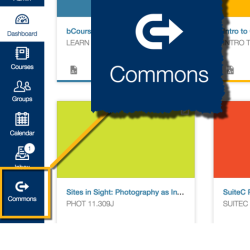
- Type “UNCG AAS Course Template” in the search box.
- Click on the card that looks like this:

- Click the blue “Import/Download” button at right. This will let you choose into which course to import the content. Once imported, you can add/edit/modify however you wish.
Additional Resources: